If you hang out on Facebook and Pinterest, you no doubt know that quote graphics are hugely popular. People love to share quotes and they are a powerful way to share your thoughts, beliefs, moods, and excerpts from your programs and content. The images that seem to grab the most attention are those quotes layered on a gorgeous image.
But what if you’re not particularly techie or you’re graphically challenged (like me)?
I’ve found and use four online apps that make creating quote graphics as easy as “copy, paste and click.”
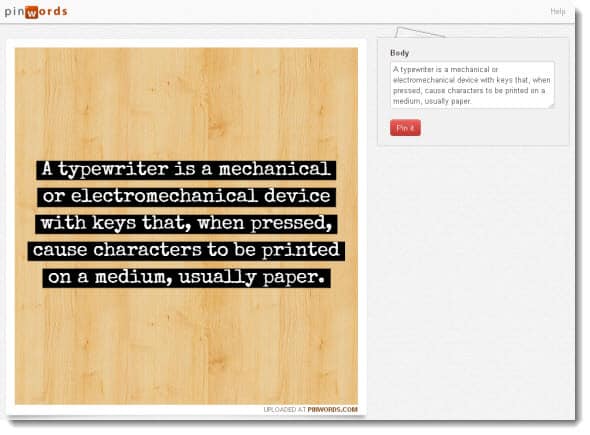
Pinwords
Upload your own image or use one of the backgrounds provided by Pinwords. Choose your text style, type your text and click the Pin It button. If you want to save the image and use upload it to Facebook or use it on your blog, right click on the image and save it to your computer.
Pinstamatic
I use this site a lot. You can create images from websites, create quotes, sticky note reminders, a Twitter profile image, a date on a calendar, or upload your own image. I use it to create all these types of images. For quotes, you have six styles and fonts from which to choose. Again, to use it on your blog or Facebook, don’t forget to save it to your computer.

Quozio
I recently discovered this quote graphic site. Again, it can’t get easier than this: type or paste your quote text, add the name of who said it and then choose the image or background you want for the quote. Pin and save to your computer. Quozio has a bit better selection of images than some of the other freebie sites.

Picmark
This site is great for branding, watermarking or adding a caption to your own images. Upload your image, choose the frame style you like (color and font), add your text, pin it, and save.
All of these quote graphic sites can be used to boost your visibility on Facebook and Pinterest. Not only can you create interesting quotes, you can use the sites to create images that promote your webinars, programs, books, and events. You’re only limited by your imagination. [I’ve linked to some of the ways I’ve used quote graphics throughout the post.]
UPDATE: I’ve created a list of sites on List.ly. Feel free to add your own favorites as well.
If there are other easy quote graphic sites you use, please post the URLs in the comments. And, share your ideas about how you use quotes on social networking sites and your blog.
Hi Denise! I have been using canva.com for all my quotes. Most of the layouts are free and others a few $. I have recently started my page in facebook. Not a writer by profession but a passionate writer!
Thank you so much! I didn’t even know what to look for when looking to place a quote in front of a pretty backdrop, so I entered just that into google and you popped up.
I will definitely use a couple of them.
Thanks again!
Great Article. (Y)
I have used quozio, but its a bit slow.
There’s some more, who are quite fast. like recite.com or designyourquotes.info ,
They are same as quozio, infact have more attractive designs.
I think you should check it out as well.
Just a note – I started using Quozio and was suspicious when it required me to download a special toolbar add-on before I could download the graphic. Luckily I stopped before downloading it, as it looks like the toolbar is a browser hijacker that infects your computer. So I would stay away from Quozio, as cool as the functionality is. You can google Allin1Convert Toolbar virus to see multiple articles about this.
Thanks for the head’s up Erin. I haven’t used Quozio for awhile but when I did, never had to download a toolbar. That must be new.
Thanks. I spend my time writing so I don’t have time to learn all the techie stuff I really need. This should make it easy to help promo my books in a more interesting manner. I’m off the see what’s out there. Thanks again.
Hi Shanon, thanks for stopping by. I’d love to hear about how you use some of these tools to promote your books.
Great! Thanks for sharing. I’m looking for a site that has the option of putting my own website at the bottom of the picture quote. Has anyone seen, or know how to do this?
Hi Sandy, thanks for stopping by. You can use PicMark (see article for link) and PicMonkey to add text to your own images. I mostly use PicMonkey to add text and manipulate my own images.
Also, http://quote4fun.com ‘s quote generator is very easy to use and has lots of options available.
Thanks for sharing the link, looks like a fun site to play with for creating quotes!
Thanks! I’ll take it as a compliment 🙂
Thanks so much! This is exactly what I was searching for!
Loved this Denise. I used all of them today and thanks for the tip.
Blessings Michele
Both Quozio and Picmark are new to me, and I gleaned from the comments both Picmonkey and Recitethis.com. All great ways to build on our (somewhat limited) graphic talents! I hear ya!
Kacee (Another spin on pinning and the tools needed that I wrote for my work:
http://websavvymarketers.com/2013/01/pinterest-tools-to-get-you-started-pinning/)
Thank you so much for the great information – I have just been having some Christmas fun trying some of the sites out! Happy Holidays from the UK.
Thanks to @NickKellet of List.ly, I discovered another site to create images from quotes: http://www.recitethis.com
Oh How I LOVE YOU DENISE. These are GREAT sites. Big fat hug to you for sharing. xx
Awww, feeling is mutual, Lynne!
Thanks for the list, Denise. I’ve been using Pinwords, but I don’t particularly like the small selection of fonts and backgrounds they have – some are even hard to read. Quozio looks promising – I’ll try it next.
To answer Beachrunner5’s comment: I’m pretty good with Photoshop, computers and design, but I prefer using such cites because of how easy and quick it is. In Photoshop, there are so many options – I could probably spend hours creating a perfect visually attractive image. With sites like Quozio, you only get so many design choices – makes it super fast!
This is awesome! I just made a ton from my new book. They all look so good:) So great, thank you so much.
Thank you! This is exactly what I’ve been searching for!
Glad the post is useful for you, Jessica…blog on!
I guess those seem like good sites for people who don’t know how to use their computers. My 15 year old daughter uses paint with great results. Power point is pretty useful too. At my social company, it’s easier for us just to jump into Illustrator or Photoshop to create these images then the hardship of logging into a free site. Different strokes for different folks. Some people need the creative help from sites like these.
Here’s another great idea SEO Marketing ideas
I would say it’s more a matter of not having design skills vs. not knowing how to use a computer. These quote sites are fast and easy to use. Personally, I’m not a graphic designer and find Photoshop to be way to complex to learn. If I can create an image is a few seconds that looks good, that’s best for me. I don’t find it a hardship to log in to a site. And, it’s great that there are so many choices for everyone, from experienced like you to graphically challenged, like me. 🙂
These sites make it look so easy, I never knew how to make those quotes before. I will put my new knowledge to good use now. Thanks!
Love these Denise! I have had a lot of fun with Pinstamatic. Haven’t seen Quozio yet, so I will be sure to take a look. I am totally loving PicMonkey as my pick of tools this year too – so addictive and I can’t believe it is free! Great post!
Seriously, I love this list of sites here. I didn’t know we have this.
Thank you. I would try this particularly the Pinstamatic because I think it’s cool.
Thanks for the awesome tools and I always use Photoshop to get things done as these tools will make my work much more easier.
Thanks Denise for this great post. I really appreciate the information. I have used Pinstamatic but love the other tools you’ve mentioned. Thank you again as I am always looking for other ways to get the word out there.
This is extraordinary, Denise. You make it all sound so simple. Thank you for this information. MOre fun things to look at!
Thank you for the resources, Denise.
I was playing around with Pinstamatic and noticed that the link went back to THEIR site when I pinned the quote rather than mine. What are the ramifications of changing the link? Clearly I created the quote photo but used their software.
Thanks,
Shelley
Great question, Shelley. I’m not aware of any ramifications. I always edit the links to go back to my site or a specific landing page. I don’t believe there is any “rule” against that.
Thanks for the links! Super useful. How do you edit the link? And, how do you save it to your computer. Once I hit “Pin” seems like it’s done.
Elaine, here’s a video tutorial I did showing how to add or change a link on a pin. If you want to save the image, do it before your pin it. Right click on the image and save to your computer.
http://youtu.be/vHk2hfo0H-0
Oh wow Denise, I was having so much fun pinning with these tools I almost forgot to come back and say thanks!!
I like Quozio a lot so far.
btw – I started a Pin Board featuring CommentLuv blogs pinned this post there.
Thanks again and have a great weekend!
Glad you’re having fun, Ilene! I like Quozio as well.
Thanks for sharing these. I had previously found Roflbot and had some success with it, but these look even more promising. I’m going to get creative over the weekend! : D
Hi Julie, have fun getting creative over the weekend. I haven’t heard of Roflbot so I’ll look into it. Thanks for the tip.
These are great, Denise! Always appreciate app suggestions from friends — thanks for sharing!
Glad you like the app suggestions, Becky!
A site that I use and recommend is picmonkey.com. It offers free, easy-to-use online photo editing. The intended market is scrapbookers, but if you know the dimensions you need, it works beautifully for quote graphics, too.
Thanks for the tip on picmonkey, Tanya. I’ve used it and like it as well.